Build an online course site with AI
Describe an online course site in plain words and Conquer builds and hosts it. This page has a live example, the prompt for it, and what happened when that prompt ran on Conquer: about 3 minutes.
Remix puts a copy of the working example in your own account. It uses no build.
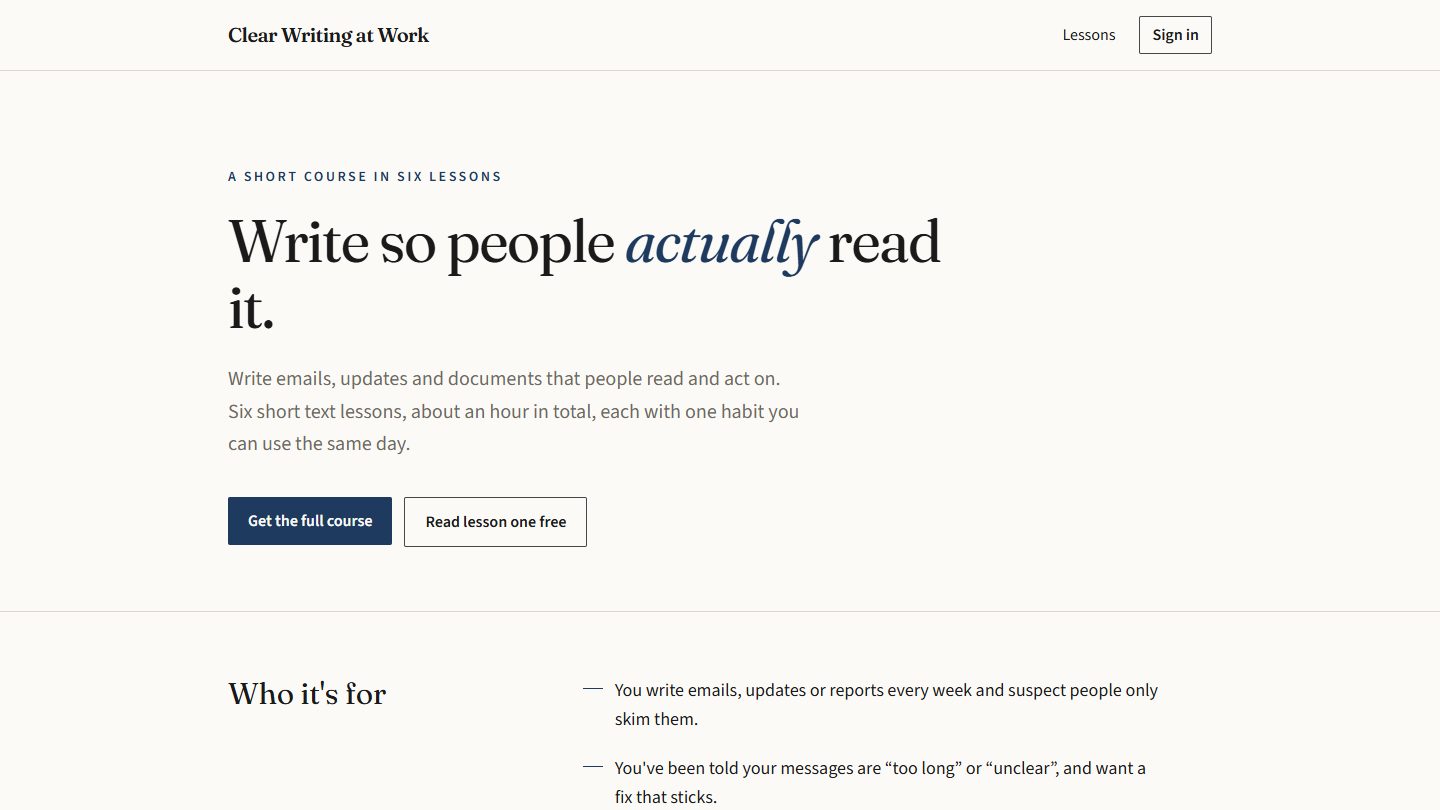
The example
A short course on one skill: a few lessons, members only, paid once.
- BUILT IN
- About 3 minutes (185 seconds, one build)
- USED
- 1 build (a Free account has 3)
- DIFFICULTY
- Medium
- GOOD FOR
- Someone who is asked the same how-to question again and again
The prompt that builds it
This is the request in full. Swap in your own business, prices and wording, then press Build this. The more you say about who it is for and what they do on it, the closer the first version lands.
What happened when the prompt ran
- REQUEST 1
“A site for a short paid course. The sales page says who it is for, what they will be able to do afterwards, the list of lessons and the price with a buy button. Members sign in with their email; paying members see every lesson as a page of text and can tick lessons off. The first lesson is free for everyone.”
Built first time in 185 seconds with no repair, in 17 files and Conquer's Editorial style: a sales page for a six-lesson course with a free first lesson, sign-in by emailed code, a lesson list members can tick off, protected lesson pages and an account page.
- The prompt gives no topic or price, so the AI used “Clear Writing at Work” as sample content.
- Lessons 2 to 6 are added in the Members tab on Conquer, not in the code.
- The buy button says “Coming soon” until Stripe is connected and a price exists.
Then make it yours
After the first build you change things by asking. Three requests to try on this one (a small edit uses a quarter of a build; fixing a word or swapping a picture by clicking on it is free):
- “Make the second lesson free as well.”
- “Show the member's progress as a bar at the top of each lesson.”
- “Add a page with the questions people ask before buying.”
What comes with it
- Hosting, with a live address the moment you deploy
- Sign-in for your users, by a code sent to their email
- Saved data with rules for who may read and change it
- Forms with an inbox, and sign-up lists with CSV export
- Stripe payments and paid memberships, paid into your own Stripe account
- Visitor numbers by page, country and source, without cookies
- Version history: go back to any earlier version
Conquer builds web apps: they run in the browser on a phone, tablet or computer. It does not make native apps for the App Store or Google Play. Apps get sign-in, saved data, forms and Stripe payments from the platform. Your own server code, scheduled jobs and connections to other services are not available yet.
Thinking of this as a business?
The idea page has the other half: who already does this, reasons for and against, and where the first customers are.
Paid mini course: the business ideaQuestions
How long does it take to build an online course site with AI?
Running the prompt on this page took about 3 minutes on Conquer. Small changes after that take seconds.
Do I need to know how to code?
No. You describe what you want, look at the result in a preview and ask for changes in plain words. You never open the code.
Can I start from this example instead of a blank page?
Yes. Remix puts a copy of the working example in your own account without using a build. Then you change it by saying what should be different.
Can it take payments?
Yes, once you connect your own Stripe account: buy buttons and paid memberships then charge into that account, and Conquer takes no cut. A buy button needs a product in your Stripe account; until then it is only a placeholder.
Is it free?
The Free plan gives you 1 project and 3 builds to get started (a small edit uses a quarter of a build, so 4 small edits make 1 build). No card is needed. Your site stays online on the Free plan.
What can't it do?
Conquer builds web apps: they run in the browser on a phone, tablet or computer. It does not make native apps for the App Store or Google Play. Apps get sign-in, saved data, forms and Stripe payments from the platform. Your own server code, scheduled jobs and connections to other services are not available yet.