DIGITAL PRODUCTS
Printable planner shop
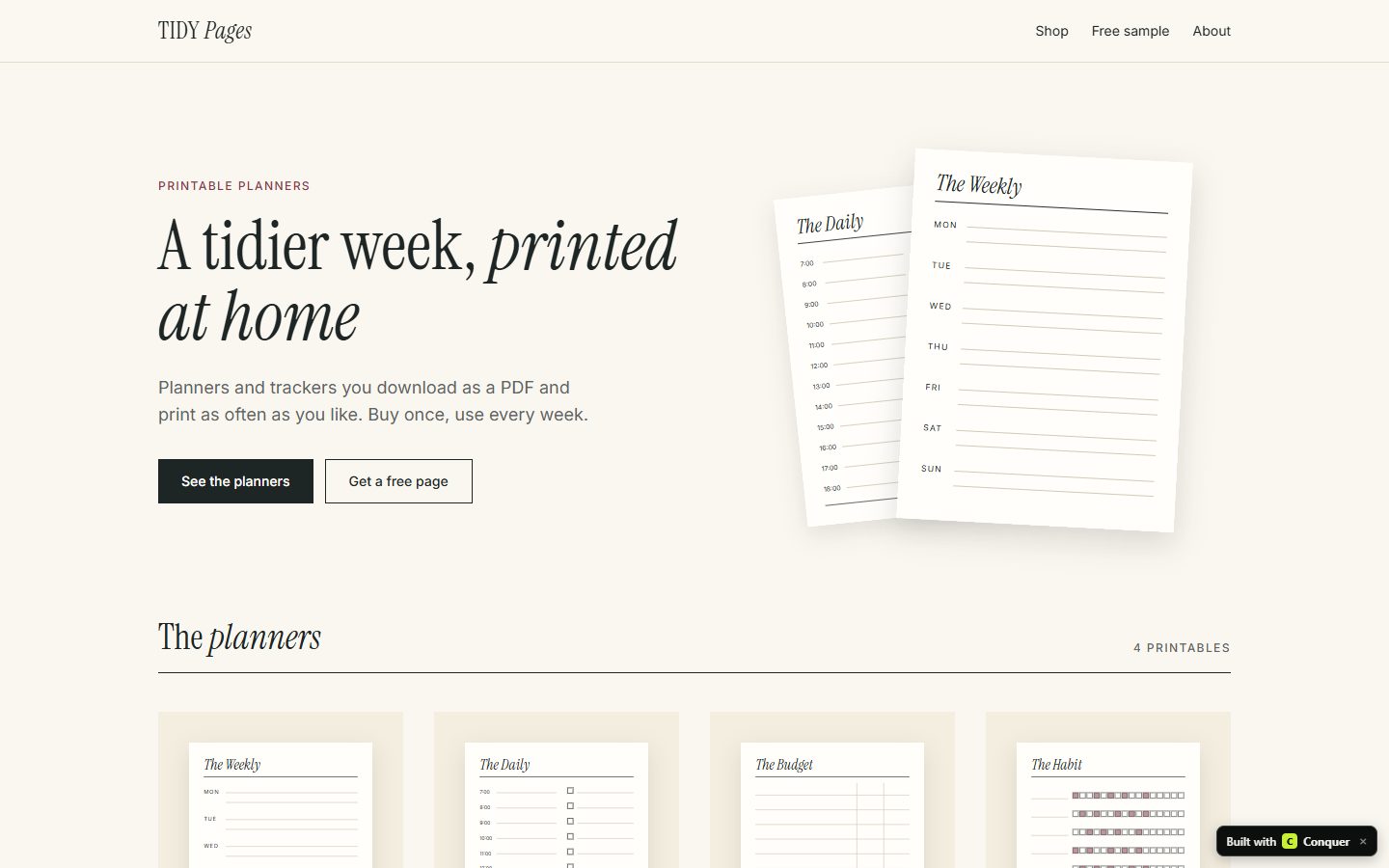
Sell planners and trackers people download and print at home, from a small shop of your own.
- TIME TO A FIRST VERSION
- About 1 minute for the build that worked (61 seconds), after two that did not
- COST TO A FIRST VERSION
- 1 build (a Free account has 3)
- DIFFICULTY
- Easy
- BEST FOR
- Someone who likes designing pages and wants a product with no stock or shipping
The problem
Printables are made once and sold many times, but a new seller on a marketplace is one listing among thousands, pays a fee on every sale, and sells more or less as the marketplace's search ranking moves. A shop of your own gives returning buyers a place to come back to.
“…it’s probably good for an extra £100-300 a month, depending on how Etsy’s algorithm is feeling at the time.”
How many customers look for this
Searches by people who want to buy what this business sells: a sign of demand from your future customers.
| SEARCH | PER MONTH |
|---|---|
| digital planner | 12,100 |
| printable planner | 1,300 |
| printable planner pages | 590 |
Average monthly Google searches in the United States, from OpenSEO (November 2026). A "near me" search counts every town, so one town sees a small share of it. Similar searches overlap, so do not add them up.
What people use today
- Etsy. Where most printables are sold: buyers are already there, and so is everyone else. Charges a listing fee and a fee on each sale.
- Gumroad. Checkout and a simple profile page for digital files. Takes 10% plus a fixed fee on each sale.
- Payhip. Digital product store with a free plan that takes 5% of each sale.
Should you build this?
REASONS TO BUILD IT
- Nothing to ship and nothing to store.
- A marketplace listing and your own shop can run side by side.
REASONS NOT TO
- Printables are easy to copy, so prices are low and the niche matters more than the design.
- Your own shop gets no visitors until you bring them.
How we built it, and what broke
PROMPT 1
A small shop for printable planners. The home page shows my planners as cards with a picture, a short description and a price. Each planner has its own page with preview pictures, what is included, the paper sizes, and a buy button. Add a section for a free sample page in exchange for an email address, and a short page about me.
This did not work. The build stopped at Conquer's time limit after about four and a half minutes and saved nothing (failed builds are not counted). It had written 16 files: a page per planner, and a drawing of every planner page in code, which is where the time went.
PROMPT 2
A small shop for printable planners, kept to one page. It shows three planners as cards with a simple picture, a short description, what is included, the paper sizes, a price and a buy button. Below them, a section where visitors leave their email address for a free sample page, and a few lines about me.
Shorter, but it failed the same way: asked for “a simple picture”, the AI started drawing the planners again and ran out of time.
PROMPT 3
A small shop for printable planners, kept to one page. It shows three planners as cards with a plain placeholder box where my own product photo will go, a short description, what is included, the paper sizes, a price and a buy button. Do not draw the planners. Below them, a section where visitors leave their email address for a free sample page, and a few lines about me.
Built first time in 61 seconds with no repair: one page with three planner cards (each with an empty box for a photo, what is included, paper sizes, price and a buy button), the free sample sign-up and a few lines about the maker, in 9 files. The planner details, prices and the about text were written by the AI and need checking. The buy buttons say “Coming soon” until Stripe is connected.
- The lesson: say where your own photos go. Asked for pictures it does not have, the AI draws them, and that is slow.
- The example you can open and copy on this page was made separately, with its own look. The steps here show what the prompt alone gives you on Conquer, in the default dark style.
Where to find the first customers
- Pinterest. Pin a preview of each page with a link to the product; printables are searched for there.
- Your Etsy shop. Put the address of your own shop in the file buyers download, with a reason to visit.
Last updated . Competitors and market notes are a starting point for your own research, not advice.
More business ideas
- SHOPSOnline shop for handmade jewelryA jewelry maker's shop with collections, product pages with materials and a form to book a permanent jewelry event.EASY TO BUILD · WORKING EXAMPLE
- SHOPSOnline shop for handmade candlesA candle maker's shop with scents, product pages with burn time and wax, and a form for custom or wholesale orders.EASY TO BUILD · WORKING EXAMPLE
- HANDMADEShop for crochet patterns and finished piecesA crochet maker's shop with patterns, finished pieces, product pages with yarn and skill level, and a custom order form.EASY TO BUILD · WORKING EXAMPLE